
The best overall AI resume builder for job seekers in India is Rezi for strict ATS compatibility, ResumeUp.AI for an all-in-one job search toolkit, and Kickresume or Canva for visual design flexibility. If you are a college fresher who needs a zero-cost option, Teal and mobile-first ATS tools offer great free plans without forcing you into a paid subscription.
Key Takeaways
- ATS Optimization is Critical: Over 80% of top Indian companies, tech firms, and MNCs use ATS software (like Taleo, Workday, and Darwinbox) to screen incoming resumes.
- Watch Out for Hidden Paywalls: Many websites let you build a resume for free, but then block clean PDF downloads unless you pay for a weekly or monthly subscription.
- Freshers vs Experienced: Freshers should highlight college projects and academic wins, while experienced professionals should use AI keyword matching to match specific job listings.
- Check the AI Output: AI tools can sometimes invent numbers or exaggerate your role. Always review the content yourself before sending it out.
Comparison of Top AI Resume Builders (2026)
| AI Resume Builder | Best For | Free Tier Limit | Paid Plan (Estimated) | ATS Optimization Score |
|---|---|---|---|---|
| Rezi AI | Strict ATS parsing and corporate roles | 1 resume with limited credits | ~$29/month (₹2,400) or $149 lifetime | 9.8/10 |
| ResumeUp.AI | All-in-one job application suite | Free basic trial | ~$4.49/month (annual) to $149 lifetime | 9.5/10 |
| Teal | Job tracking and free keyword matching | Generous free resume building and matching | ~$9/week or $29/month | 9.1/10 |
| Kickresume | Students, freshers and creative profiles | Free plan with basic templates | ~$8/month (billed annually) | 8.8/10 |
| Enhancv | Experienced professionals and tailored resumes | 7-day trial with branding | ~$16.50/month (billed semi-annually) | 9.2/10 |
| Canva AI | Visual and design-focused roles | Free plan with custom edits | Canva Pro: ₹3,999/year | 6.5/10 (design-focused) |
Why ATS Compatibility Matters for the Indian Hiring Landscape
In India’s tough job market, a single opening for a Software Engineer, Business Analyst, or Marketing Executive on portals like Naukri.com,LinkedIn India, or Foundit (formerly Monster) can get thousands of applications in just 48 hours.
To handle this volume, companies use an Applicant Tracking System (ATS).
How an Applicant Tracking System (ATS) Processes a Resume
| Step | Process | What Happens | Possible Outcome |
|---|---|---|---|
| 1 | Candidate PDF Upload | The applicant uploads their resume in PDF format. | Resume enters the ATS system. |
| 2 | ATS Parsing Engine | The system extracts text, headings, skills and work experience. | Multi-column layouts and custom graphics may cause parsing errors. |
| 3 | Resume Parsing Check | The ATS checks for plain text, standard section headings and clearly written keywords. | Well-formatted resumes are easier to read and process. |
| 4 | Keyword & Match Scoring | The system compares resume keywords, skills and qualifications with the job description. | A matching score is generated. |
| 5 | Recruiter Review Dashboard | The processed resume and matching information are presented to the recruiter. | Recruiter reviews suitable applications. |
ATS workflow at a glance:
| Resume Condition | ATS Result |
|---|---|
| Multi-column layouts or complex graphics | May cause parsing errors or unreadable content |
| Standard headings and simple formatting | Easier text extraction |
| Relevant job-specific keywords | Better keyword matching |
| Clear skills and experience | Easier recruiter review |
An ATS turns your AI resume into plain text to check your core skills and experience against the job description. If your AI resume uses fancy fonts, pictures, multi-column tables, or complex graphic elements (which happen a lot in manual design editors), the ATS software might fail to read your details. If that happens, your AI resume gets rejected automatically—even if you are fully qualified for the job.
Deep Dive: The 6 Best AI Resume Builders Analyzed
1. Rezi AI — Best for Strict ATS Optimization
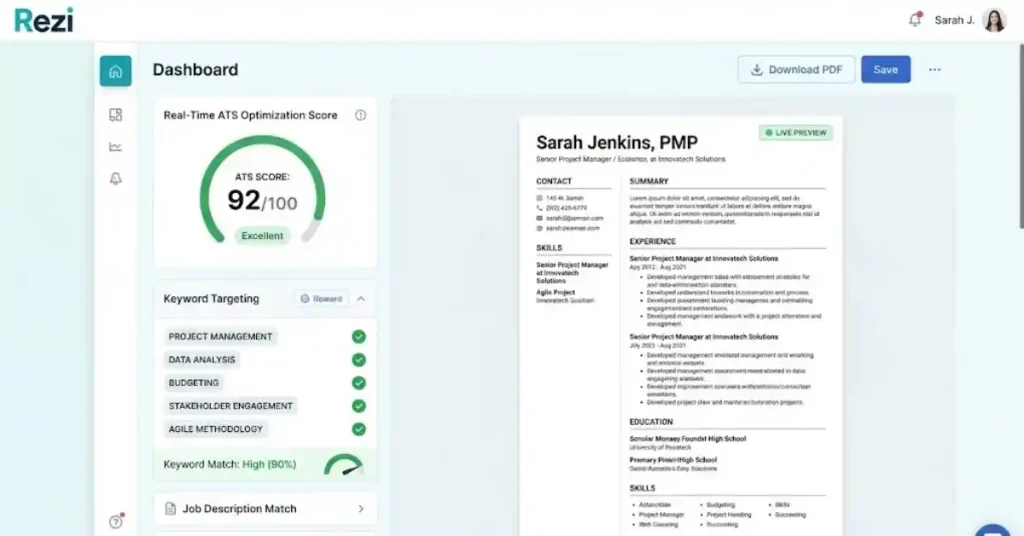
Rezi builds clean, single-column designs that are easy for ATS software to read. Instead of focusing on decoration, it sets up your content so automated filters can read it without errors.
Key Features: Real-time ATS scoring, instant bullet point generation, and automated keyword checks based on job descriptions.
Pros:
- High ATS parsing scores across corporate platforms.
- Finds missing skills directly from job ads.
- Clean, professional style that works well for IT, Banking, and Corporate jobs.
Cons: Visual templates are very plain and simple.
Pricing: Free plan for 1 AI resume. Pro starts around $29/month (~₹2,400/mo) with occasional lifetime deals.
2. ResumeUp.AI — Best All-in-One Job Search Suite

ResumeUp.AI brings together resume writing, job description tailoring, LinkedIn profile optimization, and cover letter creation in one place.
Key Features: Chat-based AI resume building (ResumeGPT), real-time 20+ point ATS check, and multi-language support.
Pros:
- Creates summaries and bullet points that match job posts closely.
- Shows clear score breakdowns so you know why points were lost.
- Saves you from using multiple separate tools.
Cons: AI bullet points sometimes exaggerate achievements, so you need to double-check them.
Pricing: Free basic access; paid plans start at ~$4.49/month billed annually (~₹375/month).
3. Teal — Best for Organized Job Search & Free Keyword Matching

Teal gives you a job tracker along with a resume builder. It lets you save multiple versions of your work history and match specific achievements to different jobs.
Key Features: Chrome extension to save job posts (from LinkedIn or Naukri), side-by-side keyword matching, and a work history storage bank.
Pros:
- Generous free plan that lets you build basic resumes without limits.
- Helps you track your applications across different job sites.
Cons:
Full AI rewriting features need a paid subscription.
Pricing: Free tier available; Teal+ costs ~$29/month (~₹2,400/mo).
4. Kickresume — Best for Freshers & Students

Kickresume gives you professional templates and AI writing tools. Its free plan never expires, making it a good choice for Indian college students and fresh grads.
Key Features: AI resume builder, cover letter writer, personal website builder, and mobile app.
Pros:
- Free plan includes basic ATS-friendly templates and clean downloads.
- Easy setup wizard for first-time users.
Cons: Advanced tailoring tools require a paid upgrade.
Pricing: Free version available; Premium options start around $8/month (~₹660/month billed annually).
5. Enhancv — Best for Experienced Professionals
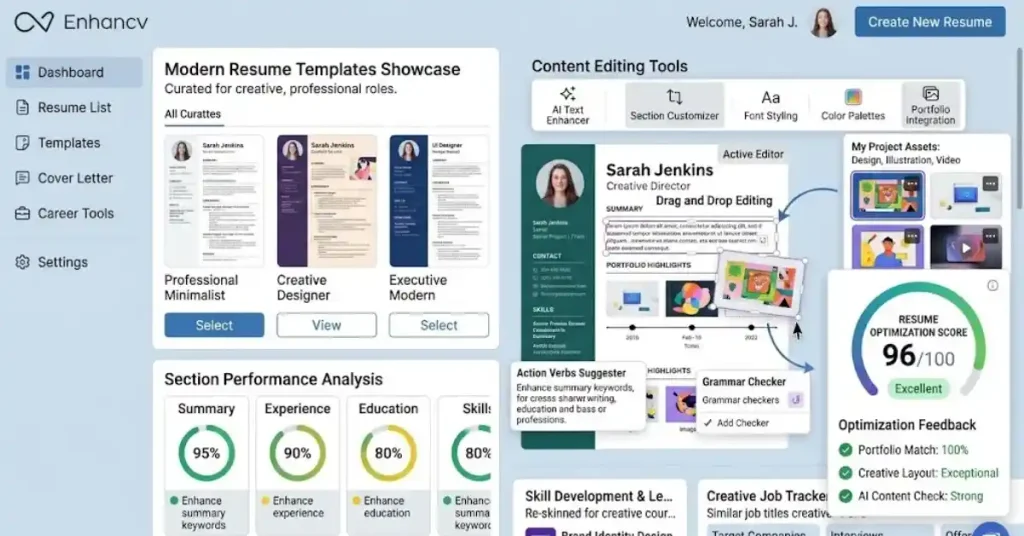
Enhancv focuses on content quality and structured editing. It helps senior professionals highlight their leadership impact and cross-functional results.
Key Features: Side-by-side AI bullet rewriting, section performance checks, and custom layouts.
Pros:
- Polished design options for management and executive roles.
- Helpful feedback on action verbs and clear writing.
Cons: Too expensive for entry-level job seekers.
Pricing: 7-day trial available; plans start from ~$16.50/month (~₹1,370/month).
6. Canva AI — Best for Design & Portfolio-Centric Roles
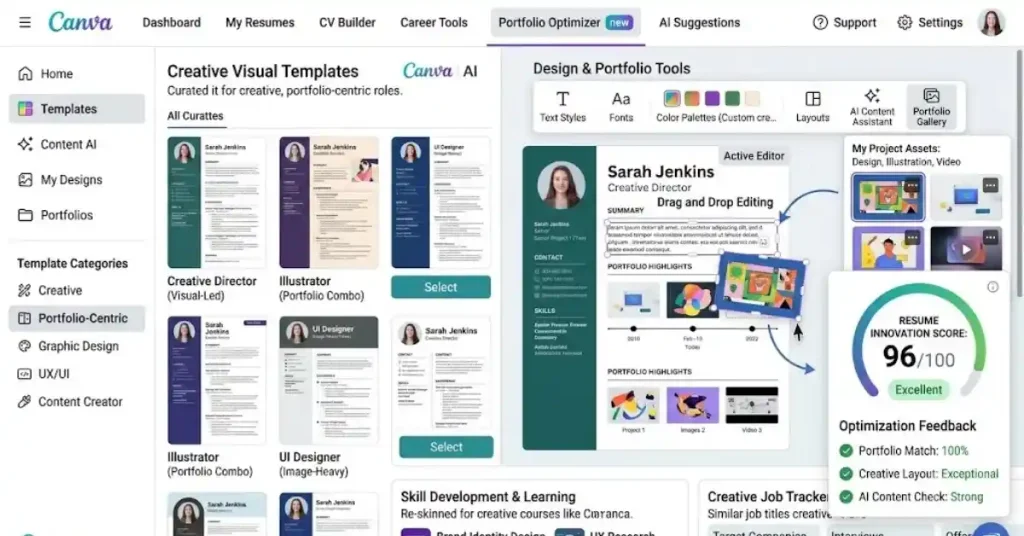
Canva’s Magic Write and AI tools are built right into its design platform.
Key Features: Drag-and-drop graphic editing, AI layout adjustments, and multi-format exports (PDF, PNG, JPG).
Pros:
- Great for visual artists, UI/UX designers, brand managers, and creative roles.
Cons: Heavy graphics and multi-column layouts often fail standard text extraction on corporate ATS checkers.
Pricing: Free templates available; Canva Pro is ₹3,999/year.
How to Choose an AI Resume Builder: Freshers vs. Experienced Professionals
| Comparison | College Freshers | Experienced Professionals |
|---|---|---|
| Main Focus | Academic projects, internships and certifications | Job description (JD) tailoring and measurable achievements |
| Key Priority | Free tools and zero-cost plans | High ATS compatibility and keyword matching |
| Important Features | Simple templates, skills sections and project highlights | ATS scoring, keyword optimization and resume customization |
| Recommended Tools | Kickresume, Teal | Rezi AI, ResumeUp.AI, Enhancv |
| Best Choice | Kickresume or Teal | Rezi AI or Enhancv |
For Indian College Freshers (0–1 Year Experience)
- Priority: Highlight college projects, internships, leadership roles, and tech certifications (like NPTEL, AWS, Python, or Coursera).
- Formatting Strategy: Keep it to one page. Put your education near the top, followed by key projects and links to your GitHub or portfolio.
- Recommended Tool: Kickresume or Teal because they offer free access and clean starter templates.
For Experienced Professionals (2+ Years Experience)
- Priority: Match your resume bullet points to the job description and show clear numbers (such as percentage growth or revenue generated in INR/USD).
- Formatting Strategy: Use a reverse-chronological layout with clear metric highlights.
- Recommended Tool: Rezi or ResumeUp.AI for deep ATS score checks and smart keyword tools.
Step-by-Step Guide: Building an ATS-Optimized Resume Using AI
- Select an ATS-Parseable Template: Choose a clean single-column or simple two-column layout. Avoid charts, skill rating bars, or floating text boxes.
- Extract Keywords from the Job Description: Paste the job description into your AI builder. Find the required hard skills (like React,js, SQL, Financial Modeling, Stakeholder Management) and soft skills.
- Draft Achievement-Oriented Bullet Points: Use AI prompts to write your past experience using the XYZ formula (Accomplished [X], measured by [Y], by doing [Z]).
- Run an ATS Diagnostic Audit: Review the plain text output of your AI resume to make sure your section titles, dates, contact details, and technical terms are read correctly.
- Export as a Clean PDF Document: Download your final AI resume as a PDF (or TXT if the job portal requires it). Make sure the text can still be highlighted.
Common Pitfalls & Mistakes to Avoid
- Blindly Accepting AI Numbers: AI tools often add fake numbers (like “Increased sales by 45%”). Replace all unverified stats with your actual numbers.
- Over-Formatting with Visual Elements: Progress bars, custom icons, and multi-layered tables confuse resume scanners. Keep your design simple and text-focused.
- Ignoring Local Portal Requirements: When uploading your AI resume to Naukri.com, check that the extracted text matches your profile details so recruiters can find you easily.
- Subscription Traps: Always check the billing terms before entering your card details on trial offers to avoid surprise monthly charges.
READ ALSO:-Best Gaming Mouse Under ₹3,000 in India (2026 Buyer’s Guide)
10.FAQ
Are free AI resume builders completely free?
Most AI resume builders use a freemium model. Tools like Teal and Kickresume let you build and download basic templates for free, while others ask you to pay before you can download your PDF.
Do Indian HR managers accept AI-generated resumes?
Yes, as long as the facts are true. Recruiters dislike generic filler words, exaggerated claims, or grammar mistakes, rather than the tools you used to format your text.
Which AI resume builder is best for freshers in India?
Kickresume and Teal work best for freshers because they have free plans, structured education sections, and easy bullet-point ideas.
How do I check if my resume is ATS friendly?
You can use the ATS check features in tools like Rezi or ResumeUp.AI, or copy-paste your PDF into a simple text editor to see if the text reads cleanly without weird symbols.
Is PDF or Word better for ATS submission in India?
PDF is usually better because it keeps your layout neat across different computers, as long as it was made in a text-based builder (and not saved as an image). Standard .docx files also work well on corporate job sites.
1 thought on “Best AI Resume Builders for Job Seekers in India (2026)”