

Finding the best tablet under ₹40,000 in India requires comparing performance, display quality, software updates, and the extra cost of accessories. At this price, tablets perform almost as well as light laptops. They feature top-tier processors, high refresh rate screens, magnetic keyboard support, and stylus pens.
Whether you need a tablet for college notes, drawing, gaming, or daily work, this guide helps you pick the right option under ₹40,000 in India.
Quick Summary: Top Picks At a Glance
- Best Overall Performance: OnePlus Pad 2 (Fast Snapdragon 8 Gen 3 processor, 144Hz 3K display, 67W fast charging).
- Best for Students & Note-Taking: Samsung Galaxy Tab S9 FE / S10 Lite (S-Pen stylus included in the box, IP68 water resistance, Samsung DeX desktop mode).
- Best for Ecosystem & Longevity: Apple iPad (10th Gen) (A14 Bionic chip, smooth iPadOS updates, strong resale value).
- Best Value for Money: Xiaomi Pad 8 / Pad 6 (Sharp 144Hz screen, quad speakers, metal body).
Comprehensive Comparison Table: Best Tablets Under ₹40,000 in India
| Tablet Model | Display | Processor | Battery & Charging | Stylus Support | Approx. Price (INR) |
|---|---|---|---|---|---|
| OnePlus Pad 2 | 12.1-inch 3K LCD, 144Hz | Snapdragon 8 Gen 3 | 9,510mAh, 67W | Stylo 2 (sold separately) | ₹39,999 |
| Apple iPad (10th Gen) | 10.9-inch Liquid Retina, 60Hz | A14 Bionic | Approx. 8,500mAh, 20W | Apple Pencil (1st Gen/USB-C) | ₹33,900–₹37,900 |
| Samsung Galaxy Tab S9 FE / S10 Lite | 10.9-inch FHD+, 90Hz/120Hz | Exynos 1380* | 8,000mAh, 25W | S Pen (included in the box) | ₹30,999–₹34,999 |
| Xiaomi Pad 8 | 11.2-inch 3.2K LCD, 144Hz | Snapdragon 8s series* | 9,200mAh, 45W | Focus Pen (sold separately) | ₹35,990 |
*Check the exact model and regional specifications before publishing. The Galaxy Tab S9 FE and S10 Lite have different specifications, and the processor and battery details listed for Xiaomi Pad 8 should be verified against the intended variant.
Detailed Reviews of the Best Tablets Under ₹40,000
1. OnePlus Pad 2 — Best Overall Performance
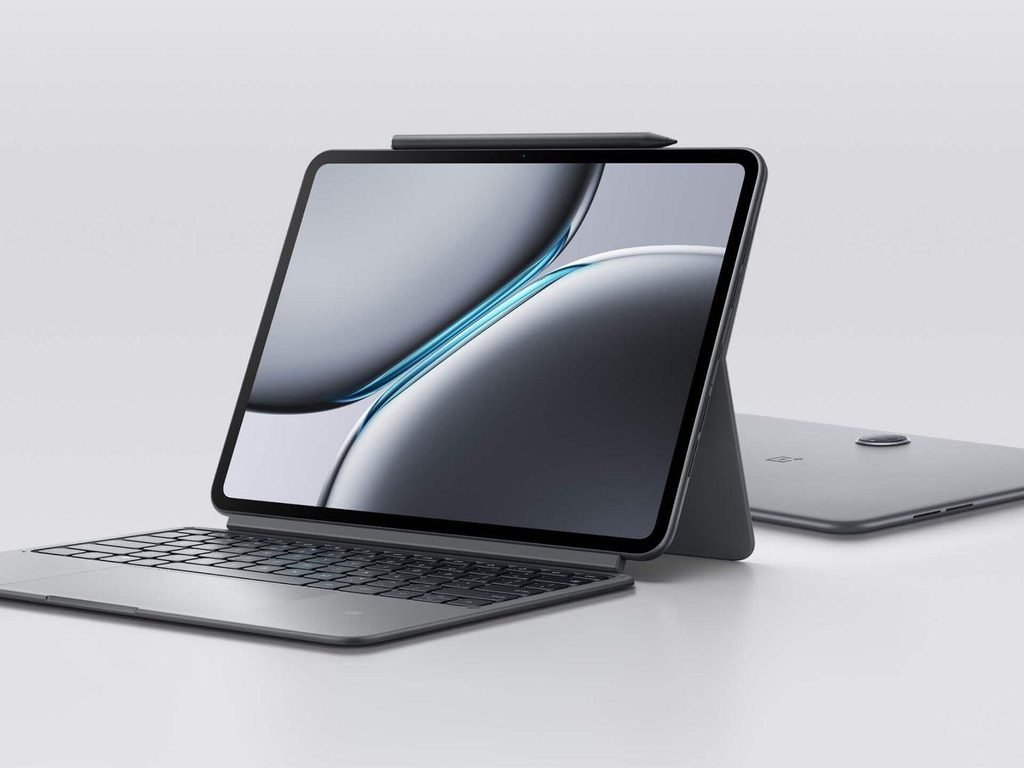
- Display: Large 12.1-inch 3K display with a 144Hz refresh rate for smooth scrolling, gaming, and video playback.
- Performance: Snapdragon 8 Gen 3 processor handles demanding games, multitasking, and productivity apps smoothly.
- Battery: 9,510mAh battery with 67W fast charging for extended use and quicker recharging.
- Multitasking: The large screen provides plenty of space for split-screen apps, reading documents, and online classes.
- Stylus support: Compatible with the OnePlus Stylo 2, which is sold separately
Downsides
- Extra accessory costs: The stylus and keyboard may cost extra, increasing the overall purchase price.
- LCD display: It does not offer the deeper blacks of an OLED display.
- Portability: Its large screen may feel less convenient to carry than a compact tablet.
- Software compatibility: Some Android apps may not be fully optimised for a large tablet screen.
Who Should Buy the OnePlus Pad 2?
- Gamers: Ideal for users who want powerful performance and a high-refresh-rate display.
- Students: A good choice for online classes, digital notes, reading PDFs, and research.
- Professionals: Suitable for multitasking, document editing, and productivity with an optional keyboard.
- Entertainment lovers: Great for watching movies and shows with its sharp display and six-speaker audio system.
2. Apple iPad (10th Gen) — Best for Reliability & Ecosystem

Key Features
- Display: 10.9-inch Liquid Retina display delivers sharp text, vibrant colours, and a comfortable viewing experience.
- Performance: The A14 Bionic chip handles everyday tasks, online classes, browsing, and many creative apps smoothly.
- Battery life: Offers all-day battery life for typical activities such as reading, streaming, and studying.
- Build quality: Its slim aluminium design makes it suitable for carrying to college, work, or while travelling.
- Stylus support: Compatible with Apple Pencil (USB-C) and Apple Pencil (1st generation), making it useful for handwriting and drawing. The first-generation Pencil requires an adapter for pairing and charging.
- App ecosystem: iPadOS offers a wide selection of educational, creative, and productivity apps.
Downsides
- 60Hz refresh rate: Scrolling and animations are not as smooth as on tablets with 120Hz or 144Hz displays.
- Accessory costs: Apple Pencil and keyboard accessories can increase the total price.
- Older processor: The A14 Bionic is less powerful than newer Apple chips, particularly for demanding creative workloads.
- Limited storage options: The base model’s 64GB storage may feel restrictive if you download large games, videos, or files.
- Charging accessories: Pencil compatibility and charging require extra attention, especially with the first-generation Apple Pencil.
Who Should Buy the Apple iPad (10th Gen)?
- Students: Great for online classes, studying, reading e-books, and taking digital notes.
- Everyday users: Suitable for browsing, video streaming, video calls, and social media.
- Creative beginners: A good option for basic drawing, photo editing, and learning creative skills.
- Apple users: Ideal for people who already use an iPhone, MacBook, or other Apple devices.
3. Samsung Galaxy Tab S9 FE / S10 Lite — Best for Students & Note-Taking
Key Features
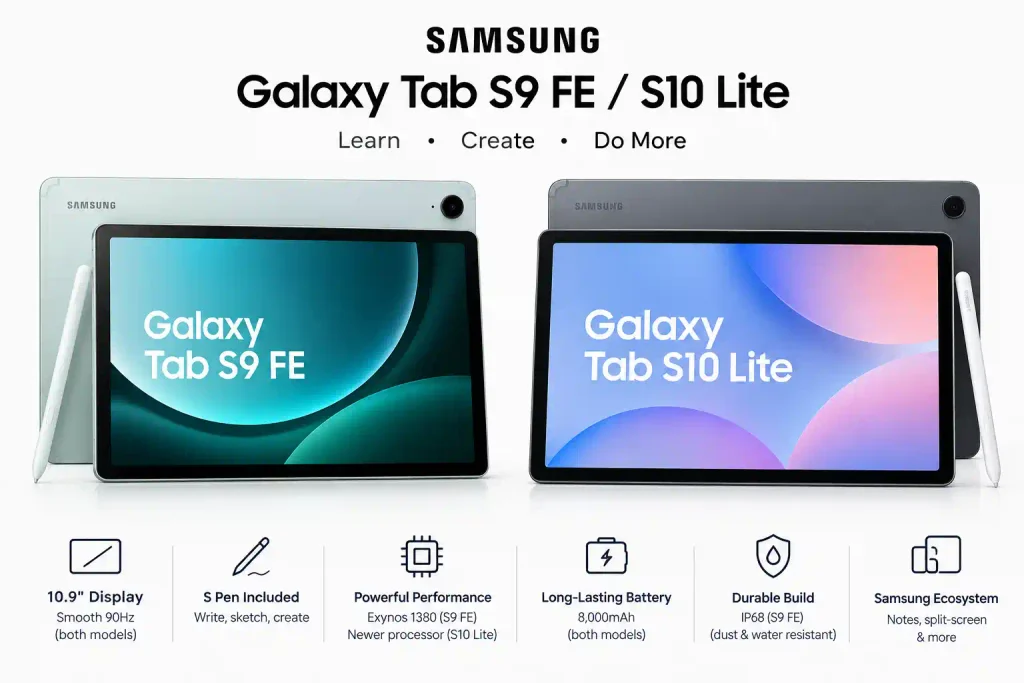
- Display: The Galaxy Tab S9 FE has a 10.9-inch LCD with a 90Hz refresh rate, while the Tab S10 Lite offers a 10.9-inch display with a 90Hz refresh rate for smooth scrolling and reading.
- Performance: The Galaxy Tab S9 FE uses the Exynos 1380 processor. The Tab S10 Lite uses a newer-generation processor, depending on the market and configuration.
- S Pen included: Both models support S Pen input, making handwritten notes, sketching, and marking up PDFs convenient without needing to buy a separate stylus.
- Battery: Both are designed for everyday tasks such as studying, browsing, video streaming, and online meetings.
- Samsung ecosystem: Samsung Notes, split-screen multitasking, and other productivity tools help with study and work.
- Build quality: The Tab S9 FE offers IP68 water and dust resistance, which is useful for added protection against accidental spills and dust.
Downsides
- Mid-range performance: Both tablets are suitable for everyday tasks but are less powerful than flagship tablets for demanding games and heavy creative workloads.
- LCD display: Neither offers the deep blacks and contrast of an OLED screen.
- Charging speed: Charging is relatively modest, so recharging the large battery can take time.
- Keyboard costs extra: A compatible keyboard cover is generally sold separately.
- Model differences: The S9 FE and S10 Lite differ in software, specifications, and durability, so check the exact model before buying.
Who Should Buy These Samsung Tablets?
- Students: Ideal for handwritten notes, online classes, studying, and reading PDFs with the included S Pen.
- Teachers and professionals: Useful for annotating documents, preparing presentations, and taking meeting notes.
- Artists and beginners: Suitable for sketching, drawing, and basic digital design.
- Samsung users: A good fit for people who want to use Samsung Notes and connect their tablet with other Galaxy devices.
- Everyday users: Suitable for browsing, video streaming, reading, and light multitasking.
4. Xiaomi Pad 8 — Best Value for Display Quality

Key Features
- Display: A high-resolution 3.2K display with a 144Hz refresh rate delivers sharp visuals, smooth scrolling, and an enjoyable gaming experience.
- Performance: The Snapdragon 8-series processor offers strong performance for demanding games, multitasking, and productivity apps.
- Battery: A large battery with fast charging supports extended use for studying, streaming, and gaming.
- Stylus support: Compatible with the Xiaomi Focus Pen, which is sold separately, for digital notes, sketching, and drawing.
- Multitasking: The spacious screen is useful for split-screen apps, reading PDFs, and working with documents.
- Entertainment: The high-resolution display and multi-speaker audio system make it suitable for watching movies and online content.
Downsides
- LCD instead of OLED: The display is sharp and colourful, but it cannot deliver the same deep blacks as an OLED panel.
- Stylus sold separately: The Xiaomi Focus Pen Pro is an additional expense for note-taking and drawing.
- Keyboard costs extra: A compatible keyboard increases the total cost if you plan to use the tablet for work.
- Android app optimisation: Some apps may not make full use of the large screen or tablet-style multitasking features.
- Cameras are basic: The cameras are suitable for video calls and document scanning but are not a major strength.
Who Should Buy the Xiaomi Pad 8?
- Gamers: Ideal for users who want a powerful processor and a smooth 144Hz display.
- Students: Suitable for studying, reading PDFs, attending online classes, and taking digital notes with an optional stylus.
- Entertainment lovers: A strong choice for movies, streaming, and music thanks to its high-resolution display and Dolby Atmos quad speakers.
- Professionals: Useful for multitasking, editing documents, and presentations with an optional keyboard.
- Digital artists: Worth considering for sketching and drawing with the compatible Focus Pen Pro.
How to Choose the Right Tablet Under ₹40,000
Consider these factors to get the best value for your money:
1.Gaming & Media: Choose a tablet with a 120Hz or 144Hz refresh rate and a powerful processor, such as one from the Snapdragon 8 series, for smooth gaming and enjoyable video playback.
Note-Taking & Design: Look for a tablet that supports a stylus pen, making it easier to write notes, sketch, draw, and work on creative projects.
. Remember total costs—Samsung includes the pen in the box, while Apple and OnePlus sell pens separately.
Office Work: Look for desktop window modes like Samsung DeX or OxygenOS Open Canvas.
2. Connectivity: Wi-Fi vs. 5G
If you travel often or work outdoors, choose a 5G tablet. If you mostly use your tablet at home, college, or an office with Wi-Fi, buy a Wi-Fi-only model. You can spend the saved money on extra internal storage instead.
3. Screen Size and Shape
- A 10.9-inch display is compact and lightweight to carry. A larger 12.1-inch display provides more room for multitasking, using split-screen apps, and reading PDF documents comfortably.
- Hidden Costs: Stylus and Keyboard Accessories in India
- When planning to buy a tablet under ₹40,000, remember to include the additional cost of a stylus pen and keyboard, as these accessories may be sold separately.
- Samsung: S-Pen stylus included in the box (₹0 extra). Official Keyboard Case costs about ₹6,000 – ₹8,000.
- Apple: Apple Pencil (USB-C / 1st Gen) costs between ₹7,900 – ₹9,500. Folio Keyboards cost between ₹8,000 to ₹15,000.
- OnePlus: OnePlus Stylo 2 costs about ₹4,999 – ₹6,999. Smart Keyboard costs about ₹7,999.
- Xiaomi: Xiaomi Focus Pen costs about ₹4,999. Smart Touchpad Keyboard costs about ₹5,999.
READ ALSO:Best Air Purifier in India (2026): Top Picks, Real CADR & Filter Costs
FAQ
Q1: Can a tablet under 40000 replace a laptop?
Yes, for basic tasks. If you edit simple documents, attend video calls, write handwritten notes, check emails, and watch media, a tablet under ₹40,000 with a keyboard case works well as a laptop substitute. However, for advanced software coding, heavy video editing, or complex Microsoft Excel files, a normal Windows laptop or Mac remains necessary.
Q2: Is 64GB storage enough for a tablet in 2026?
64GB storage is limited if you install large 3D games (like Genshin Impact or BGMI), download offline 4K movies, or store heavy PDF files. For long-term use without filling up memory, 128GB or 256GB storage is recommended.
Q3: Which tablet is best for student note-taking under ₹40,000?
The Samsung Galaxy Tab S9 FE / S10 Lite series is the best pick for students. It includes the stylus pen in the box for free, supports palm rejection so your hand won’t make unwanted marks while writing, and comes with Samsung Notes installed.
Q4: Is 5G necessary on a tablet?
5G is useful if you travel often and need internet without draining your phone’s hotspot battery. However, if you use your tablet mostly at home, in class, or in an office with reliable Wi-Fi, a Wi-Fi-only model gives you better value for money.
Q5: Should I buy an iPad or an Android tablet under ₹40,000?
Buy an iPad if you want software updates for many years, higher resale value, and tablet apps like Procreate. Buy an Android tablet (like OnePlus or Xiaomi) if you prefer smoother 144Hz displays, faster battery charging, simple file transfers, and more storage for the price.
1 thought on “Best Tablet Under 40000 in India:”