
Finding a best gaming laptop under ₹65,000 in India can be challenging, especially if you want an RTX 4050 GPU and solid overall performance. There are many good options, but it is easy to make a mistake. For instance, you could end up with a laptop that overheats quickly or struggles with demanding games because of its underpowered graphics card
If your budget is strictly ₹65,000, your main goal is to get the best raw gaming performance. You also want a machine that will run smoothly for the next 3 to 4 years.
In this guide, we list the top gaming laptops under 65k in India. We focus on Total Graphics Power (TGP), cooling (thermals), and real-world gaming performance.
Quick Answer: Top Picks at a Glance
If you want a quick overview, here are the three best gaming laptops in this price segment.
| Model | GPU (Graphics Card) | Processor | Approx. Price (INR) | Best Feature |
|---|---|---|---|---|
| Acer Nitro V | RTX 4050 (75W) | Intel Core i5 13th Gen | ₹64,990 | Best overall RTX 4050 performance |
| Lenovo LOQ | RTX 3050 6GB (95W) | Intel Core i5 12th Gen | ₹61,990 | Best build quality and thermals |
| ASUS TUF F15 | RTX 3050 (75W) | Intel Core i5 12th Gen | ₹59,990 | Military-grade durability |
(Note: Prices change often on Amazon and Flipkart. An RTX 4050 model might temporarily cross ₹65,000 without bank offers. Always check for card discounts).
Key Takeaways Before You Buy
Check the TGP: TGP shows how much power the graphics card uses. A 45W RTX 4050 may perform worse in games than a 95W RTX 3050, depending on the laptop’s overall design and power limits. Always choose a laptop with a TGP of 70W or higher.
Avoid 4GB Graphics Cards: Do not buy the older 4GB version of the RTX 3050. Modern games need at least 6GB of VRAM (graphics memory) to load properly. Choose a laptop equipped with either an RTX 3050 6GB or an RTX 4050 6GB graphics card.
RAM is Crucial: Many laptops in this budget come with just 8GB of RAM. You will need to upgrade to 16GB (using two 8GB sticks) right away to stop games from lagging.
Best Gaming Laptops to Buy Under ₹65,000 in India
Here is a clear breakdown of the top models currently selling in the Indian market.
1. Acer Nitro V – Best Gaming Laptop with RTX 4050
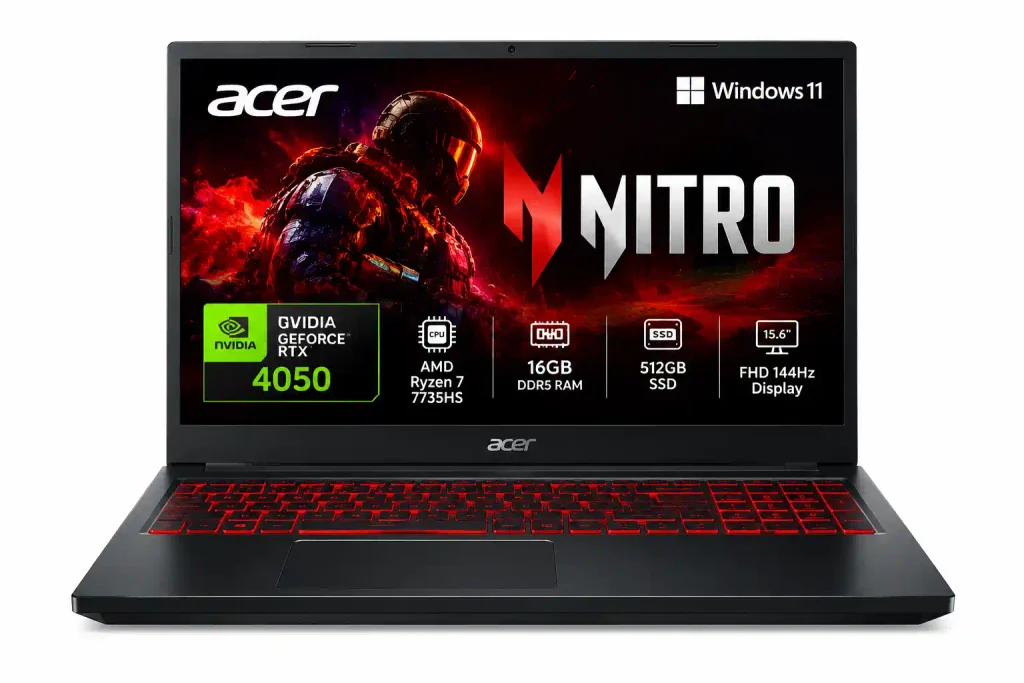
If you want the absolute Best Gaming laptop under 65000 with an RTX 4050, the Acer Nitro V is the top choice. During sales, card discounts often bring the price below 65k.
| Specification | Details |
|---|---|
| Processor | Intel Core i5-13420H |
| Graphics | NVIDIA GeForce RTX 4050 (75W TGP) |
| Display | 15.6-inch Full HD (FHD), 144Hz |
| RAM | 16GB DDR5 |
| Storage | 512GB Gen4 SSD |
Its biggest advantage is the RTX 4050 GPU, which supports NVIDIA DLSS 3 and can help improve frame rates in supported games. The 144Hz display also delivers smoother motion in fast-paced titles such as Valorant, Counter-Strike 2, and BGMI when played through supported platforms.
Who should buy it? The Acer Nitro V is worth considering if you prioritise gaming performance, a high-refresh-rate screen, and up gradeable memory over a premium design. However, check the current price, GPU power limit, display specifications, and exact model number before purchasing, as configurations and prices can vary.
Why it wins: It gives you an RTX 4050 at a price where other brands only offer a 3050.The RTX 4050 features DLSS 3 with Frame Generation technology to help boost gaming performance. This feature artificially boosts your frame rates in heavy games like.
Heavy Games You Can Play
| Game | Recommended Settings | Expected Experience |
|---|---|---|
| Cyberpunk 2077 | Medium–High, DLSS on | Smooth gameplay with optimised settings |
| Red Dead Redemption 2 | High | Good 1080p performance |
| Hogwarts Legacy | Medium–High, DLSS on | Playable; manage ray tracing and textures |
| Black Myth: Wukong | Low–Medium, upscaling on | Demanding; settings need careful tuning |
| The Last of Us Part I | Medium, DLSS on | Playable, but VRAM usage can be high |
| Forza Horizon 5 | High–Ultra | Smooth racing experience |
| Elden Ring | High | Generally smooth; game is capped at 60 FPS |
| Call of Duty: Warzone | Competitive settings, upscaling as needed | Good potential for high-refresh-rate gameplay |
These are indicative settings, not benchmark-tested FPS figures. For the heaviest games, start at 1080p Medium, enable DLSS where available, and reduce ray tracing if performance drops.
Important: The 144Hz display does not mean every AAA game will reach 144 FPS. The RTX 4050 is best suited to balanced 1080p gaming rather than maximum settings in every demanding title.
The downside: The laptop body is mostly plastic, and the speakers are just average
2. Lenovo LOQ (Best Build Quality and Thermals)
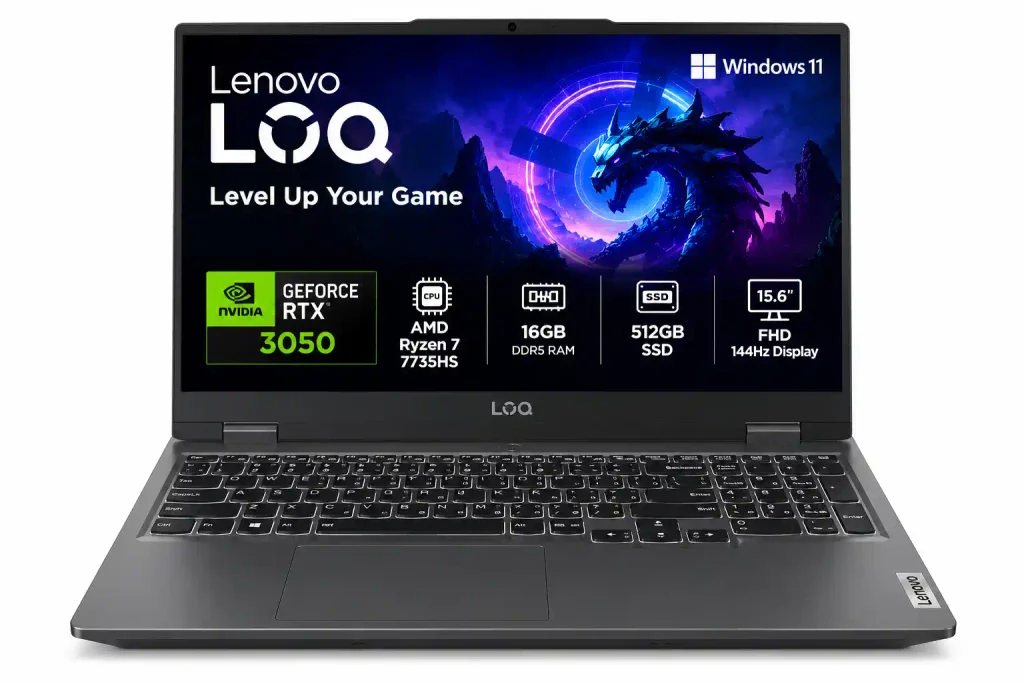
Lenovo replaced its IdeaPad Gaming laptops with the LOQ series. This brings premium cooling to budget laptops. Finding the RTX 4050 version under 65k without student discounts is hard. However, the RTX 3050 6GB model is very powerful
| Specification | Details |
|---|---|
| Processor | Intel Core i5-12450HX |
| Graphics | NVIDIA GeForce RTX 3050 6GB (95W TGP) |
| Display | 15.6-inch Full HD (FHD), 144Hz |
| RAM | 16GB DDR5 |
| Storage | 512GB SSD |
Who Should Buy It? The Lenovo LOQ is a good choice for gamers who prioritise a sturdy design, reliable cooling, and consistent performance during long gaming sessions. With the listed Intel Core i5-12450HX processor, RTX 3050 6GB graphics at 95W TGP, 16GB DDR5 RAM, and a 144Hz display, it is suitable for 1080p gaming, college work, coding, and multitasking
Why it wins: The Acer Nitro V stands out because its RTX 4050 6GB GPU offers a performance advantage over many RTX 3050 laptops in the same price range. With DLSS 3 support, an Intel Core i5-13420H processor, 16GB DDR5 RAM, and a 144Hz display, it delivers a strong combination of gaming performance, smooth visuals, and multitasking capability for budget-conscious gamers.
The downside: It is big and heavy. College students might find it hard to carry every day.
3. ASUS TUF Gaming F15 (Most Durable)
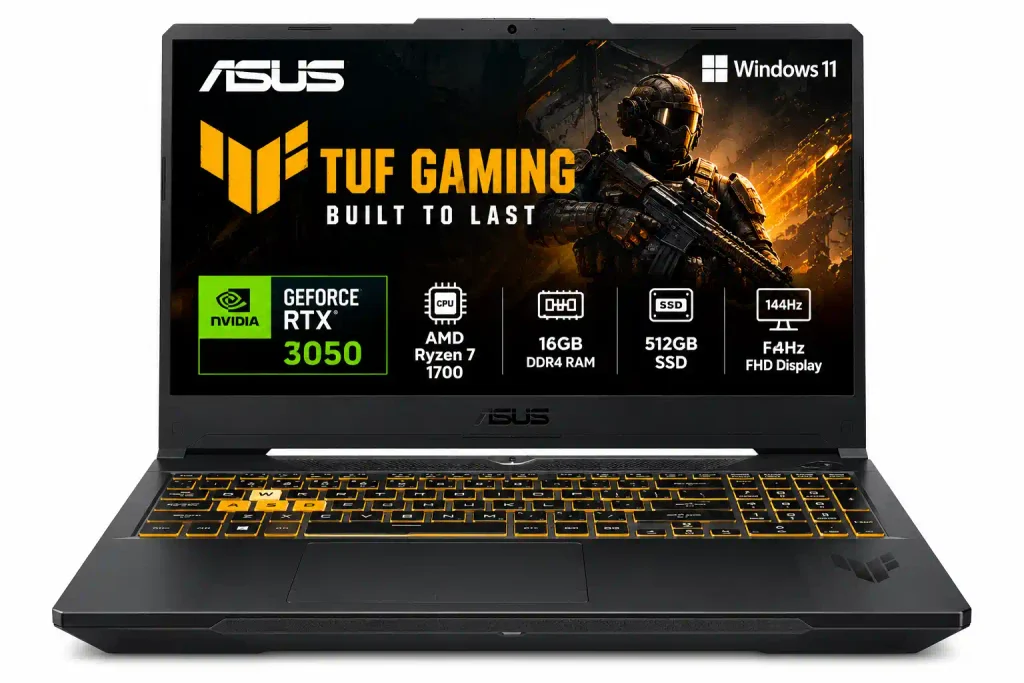
The ASUS TUF series has been a favourite for Indian budget gamers for years. It is built tough, which is perfect for hostel life.
| Specification | Details |
|---|---|
| Processor | Intel Core i5-12500H |
| Graphics | NVIDIA GeForce RTX 3050 (4GB/6GB VRAM, 75W TGP) |
| Display | 15.6-inch Full HD (FHD), 144Hz |
Tip: Confirm whether the specific ASUS TUF F15 variant has 4GB or 6GB of VRAM, as specifications can vary by model.
Why it wins: The TUF F15 earns this spot through its MIL-STD-810H-tested durability, a gaming-focused cooling system, and a 144Hz display for smoother gameplay. it can handle 1080p gaming, college projects, coding, and everyday multitasking and Selected configurations also include a MUX switch and upgradeable RAM and SSD, making it a practical option for long-term use.
Best Feature: Military-standard durability testing and a robust gaming-focused design.
The downside: The fans get loud when gaming. Also, the screen colours look a bit dull compared to the Lenovo LOQ.
4. HP Victus 15 (Best Professional Look)
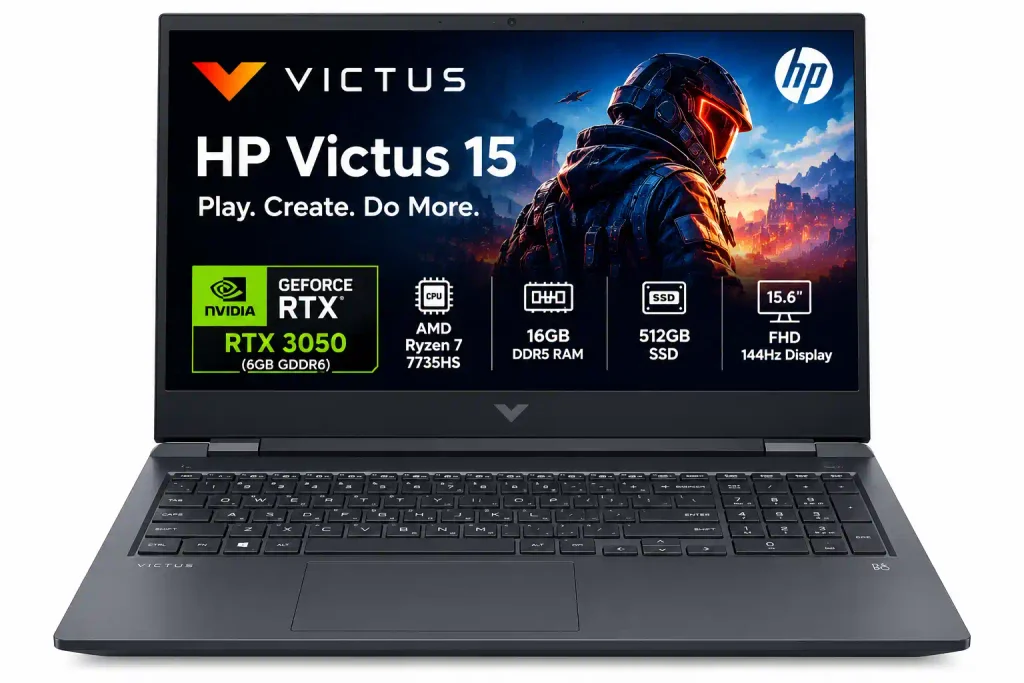
Do you want a laptop that runs GTA V at night but looks like a normal office laptop during the day? The HP Victus is the right pick.
| Specification | Details |
|---|---|
| Processor | AMD Ryzen 5 5600H or Intel Core i5-12450H |
| Graphics | NVIDIA GeForce RTX 3050 (75W TGP) |
Whould should buy it? The HP Victus 15 is ideal for students, working professionals, and casual gamers who prefer a clean, understated design over an aggressive gaming look. It suits users who need one laptop for college assignments, office work, coding, video editing, and 1080p gaming. Its professional appearance makes it suitable for classrooms, offices, and meetings, while its dedicated NVIDIA RTX 3050 graphics (on the relevant configuration) provide gaming capabilities after work or study.
Why it wins: The HP Victus 15 stands out for its understated professional design, making it suitable for both office environments and gaming setups. Its combination of a capable processor, dedicated RTX 3050 graphics (on selected variants), and a high-refresh-rate display delivers a practical balance of productivity and entertainment. HP also provides very reliable after-sales service in Tier-2 and Tier-3 cities in India.
The downside: The screen wobbles easily because the hinge is a bit weak. Also, it only has one SSD slot. If you want to increase storage, you must replace the old drive instead of just adding a new one.
3 Realities to Accept Under ₹65,000
When you buy a Best Gaming laptop under 65000 with a graphics card, you have to accept a few limits. Here is what you should expect:
Display Color Quality: Most laptops in this price range come with a 45% NTSC display, which covers roughly 62% of the sRGB color space. This is good enough for gaming and coding, but it may not provide the color accuracy needed for professional photo editing or color grading.
Battery Life is Poor: Gaming laptops use a lot of power. You will only get about 2 to 3.5 hours of battery life for normal use like browsing or YouTube. While gaming, you must keep the laptop plugged into the wall charger. If not, your game will lag heavily.
Heavy Weight: With the heavy power adapter, these laptops will add more than 2.5 kg to your bag.
How to Buy Smart in India
Wait for Sales: If you want an RTX 4050 gaming laptop, wait for the Amazon Great Indian Festival or Flipkart Big Billion Days. Laptops that usually cost ₹72,000 often drop to ₹62,000 with credit card discounts (like SBI, HDFC, or ICICI).
Compare upgrade options: Check for additional RAM slots, SSD expansion, and the cost of upgrades
Upgrade the RAM Properly: If your laptop has 8GB of RAM, buy another 8GB stick from Amazon (usually around ₹1,800). Get it installed at an official service centre. If you open the laptop yourself, you might void the warranty depending on the brand’s rule in India.
Use a Cooling Pad: Indian summers are very hot, which is bad for electronics. A budget-friendly cooling pad or laptop stand costing around ₹1,000 may help improve airflow and lower processor temperatures by a few degrees, depending on the laptop and setup.
Check the warranty: Buy from a reputable seller and confirm the warranty coverage, service availability, and return policy in India
Frequently Asked Questions
Is the RTX 4050 available under 65000 in India?
Yes, but usually only during big online sales or on specific models like the Acer Nitro V or MSI Thin. Normally, most RTX 4050 laptops cost between ₹70,000 and ₹75,000.
Which is better for gaming: RTX 3050 6GB or RTX 4050?
The RTX 4050 is much better. It gives better overall performance and features DLSS 3.0 (Frame Generation). This feature helps you get much higher frame rates in newer games.
Can I run GTA 6 on a laptop under 65000?
Rockstar has not yet released the official PC system requirements for GTA 6. However, an RTX 4050 laptop with 16GB of RAM should be able to run the game on Low to Medium settings at 1080p when it finally releases on PC.
Does upgrading RAM void the laptop warranty in India?
Most brands (like ASUS, Lenovo, and HP) allow you to upgrade RAM without voiding the warranty, as long as you do not damage any inside parts. However, it is always safest to get the RAM upgraded at an official brand service centre.
Why is my gaming laptop lagging without the charger?
Gaming laptops are built to draw maximum power from the wall plug. When you run them on battery, the laptop cuts power to the graphics card and processor to save battery life. This causes huge frame drops in games. Keep your laptop plugged into the charger while gaming.
What is TGP in gaming laptops?
TGP stands for Total Graphics Power. It shows how much electricity (in Watts) the graphics card is allowed to use. A graphics card with a higher TGP (like 95W) will perform much better than the same card locked at a lower TGP (like 45W)
READ ALSO:Best Insurance Policies in India : Types, Benefits and Buying Guide